How to Fix Bypass Issues on A12 Devices
This guide will help you resolve common issues with A12 Bypass
✅ Fix iCloud Sign-In Issues After Activation Lock Bypass (A12 Devices)
After successfully bypassing the Activation Lock on your A12 iPhone or iPad, you may experience problems signing in to iCloud. To fix this, follow the steps below:
🔧 Step 1: Add a Proxy on iPhone (via Wi-Fi)
- 1. Open Settings → go to Wi-Fi
- 2. Find the network you're connected to and tap the ℹ️ ('i') icon
- 3. Scroll down to the HTTP Proxy section. Tap 'Configure Proxy'
- 3. Select Manual
- Server: fix.iremove.tools
- Port:2525


Enter the following details:
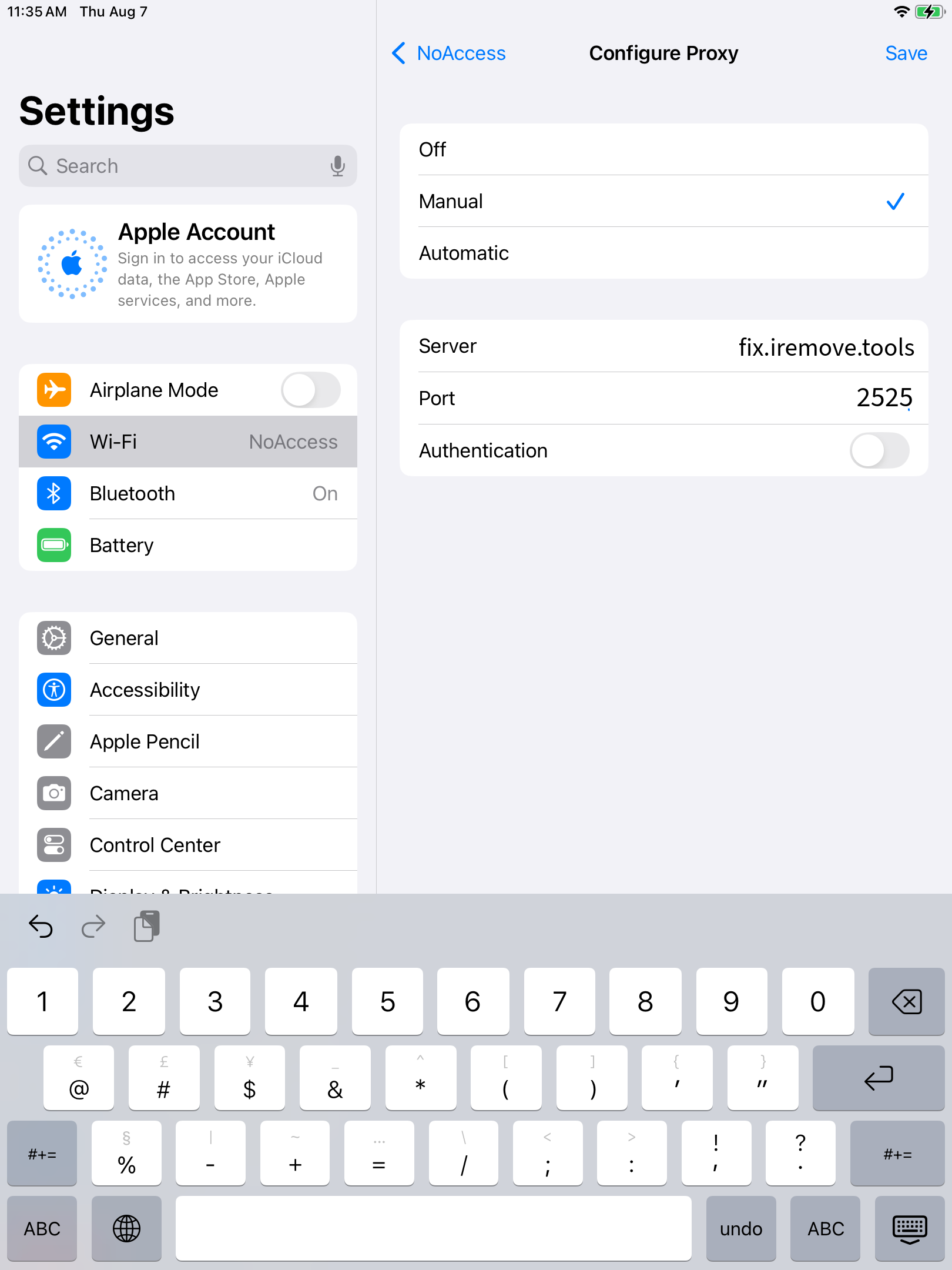
Click Save icon in the upper right window. Return to the previous screen — your proxy settings will be saved.
📥 Step 2: Sign it into iCloud


🚫 To Disable the Proxy Later: Once you logged in to iCloud, dont forget to disable WI-FI proxy settings.
Go to Wi-Fi settings → tap the ℹ️ next to your network → set HTTP Proxy to Off
🔒 Note:
This method only works over Wi-Fi.
If you need to sign to iCloud again in future, please complete this guide steps again
分享。
iPhone及iPad解锁软件

![MacOS远程管理[MDM]绕过软件](/assets/img/banners/find-my-mac-unlock-without-icloud-password.svg)
iRemove 新闻

USBLiter8 BootROM Exploit Explained | A12 & A13 Apple Devices
Learn how the USBLiter8 BootROM exploit works on Apple A12 and A13 devices. Explore SecureROM exploitation, Pwned DFU mode, supported devices, security implications, and research applications.
iCloud Unlock for iPhone 15 Series with iRemove Software
Unlock iCloud on iPhone 15 Series effortlessly with iRemove Software. Learn how to bypass Activation Lock on iPhone 15, 15 Plus, 15 Pro, and 15 Pro Max.
Bypass iCloud and Unlock iPhone 14 with the iRemove Software
Bypass the Activation Lock on any iCloud-locked iPhone 14 series model, including the 14 Plus, 14 Pro, and 14 Pro Max, using iRemove Software!
Bypass iCloud Lock from iPhone XR, XS, and XS Max
Use iRemove Software to Bypass iCloud Activation Lock on any iPhone XR, XS, and XS Max models. The fast and effective iCloud Unlock hardware method.

Bypass iCloud on iPhone 11 Series: 11, 11 Pro and 11 Pro Max
Bypass the iCloud Activation Lock on any iPhone 11 series model, including 11 Pro and 11 Pro Max, using the iRemove Activation Lock Bypass Tool!
Remove - Bypass the Activation Lock on iPhone 12 Series
Unlock the Activation Lock on your iPhone 12, 12 Pro, 12 Pro Max, and 12 Mini quickly and easily with iRemove iCloud Bypass Software.
Unlock iPhone 13 with iRemove Software: Easy iCloud Bypass!
Learn how to bypass iCloud and remove Activation Lock from iPhone 13 series (13 Pro, 13 Pro Max) using iRemove Software. Guaranteed success in 2024!
Bypass iOS 16 iCloud Activation Lock Screen
Best iOS 16 iCloud Bypass solution for iPhone and iPad Devices with Activation Lock
Remove Activation Lock without Previous Owner
All methods to ☆ REMOVE ACTIVATION LOCK WITHOUT PREVIOUS OWNER ☆ Ultimate how to guide for iPhone and other iOS users.
Bypass the Activation Lock on an iPad
Reliable Ways to Bypass the Activation Lock on an iPad without Apple ID Password and Previous Owner